
Zeropark Agentic Optimization Documentation
Feature Overview
Zeropark supply is becoming open to agent-based optimization!
We’re introducing an advanced feature powered by the Model Context Protocol (MCP). You can now build your real-time optimization Agent on top of our server. Automate the strategy execution in Zeropark, reduce manual effort, speed up optimizations, and improve return on ad spend (ROAS).
If you’re focused on performance or business side of performance advertising, make sure to contact your tech owners to proceed with integration! They should find it quite easy!
How to access the feature?
In the first stage, we’ll need to activate your MCP access token. Create it in the panel, and pass its name to us!
- The feature is available to advertisers who have access to Commerce Media formats or are API users.
- Activation requires enrolling via the Advertiser Dashboard or through an Account Manager.
- The feature requires MCP server integration. Zeropark will activate your dedicated API token.
- No additional learning curve or configuration needed.
What are the benefits?
- Faster Optimization: Immediate, data-backed access to Zeropark’s traffic supply via MCP.
- Reduced Manual Effort: Advertisers can build agents to automate traffic selection and campaign adjustments.
- Advertiser Control: Remain in control. Full freedom to design, accept, adjust, or reject traffic suggestions based on the agent’s logic.
- Ecosystem-Wide Compatibility: Available across the entire Zeropark Commerce Media supply. Access traffic sources you may not have initially considered.
Activation Kit
Definitions
| AI Agent | An Agent is built on top of an LLM of your choice, using AI to analyze Zeropark’s data and give optimization suggestions. |
| MCP (Model Context Protocol) | To quote Anthropic: The Model Context Protocol is an open standard that enables developers to build secure, two-way connections between their data sources and AI-powered tools. The architecture is straightforward: developers can either expose their data through MCP servers or build AI applications (MCP clients) that connect to these servers. Entry-level info: We provide the data & actions, and you can connect to these servers. |
| API (Application Programming Interface) | An API is a standardized protocol that allows different software systems to communicate. This way, you can automate campaign creation and optimization with our platform. MCP integration supports API by becoming a gateway for agents to get data from our server. Entry-level info: An API is like a bridge that lets your tool or app talk directly to Zeropark and manage campaigns. MCP integration allows you to create an AI Agent to fetch data and optimize automatically. |
| Tokens | A token is a secure authentication string that grants your system access to Zeropark’s API. It should be stored safely and used in the Authorization header of each MCP request. Entry-level info: A token is like a password for your automatic communication with us. It lets your software talk to Zeropark and manage campaigns. You create it in the Zeropark panel in the Security tab. |
| Agentic Optimization Feature | Think of it like this: – You can set up a simple AI agent to communicate with our ecosystem, understand your rules and needs. – You can plug this into automated campaign management via API, so the actions are taken automatically. No complex setup needed. |
Step 1: Create a Token
To start, visit Zeropark Advertiser Account, and create a new token. Make sure to choose a meaningful name that’ll be easy to identify (such as “mcp_integration”). You can either follow the in-panel automatic guide or complete the step on your own.
1. Visit the Security tab in your Zeropark Account
2. Click “Add new token.”

3. Provide a meaningful name of the new token.

4. The panel will generate your own, custom token. Copy it and store somewhere safe. Do not share the token.
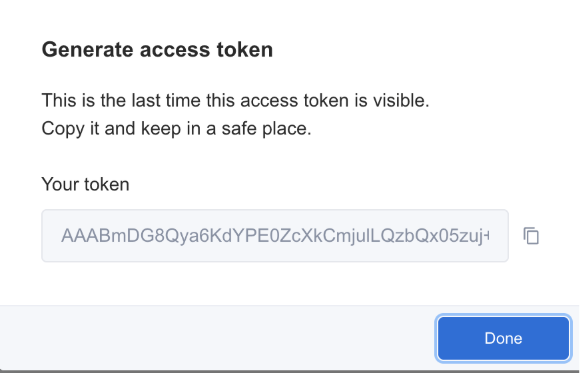
5. Now, pass the token to our team. Either send it to your Account Manager or launch a special window by clicking on the last step in the checklist.
⚠️ You shouldn’t send us the actual token — just the name.
Once you submit the name, our team gets notified to grant you all necessary accesses.
Step 2: Zeropark Connects Your Token
This is when our team grants you access to the feature! API is available to all clients, but the MCP layer becomes available only on demand. Don’t worry, it doesn’t take longer than 3 business days to receive access.
In the meantime, you can start setting up your custom agent. Once your token is activated, you’ll receive an in-panel confirmation.
Step 3: Launch
Once your token is activated, add it to your communication with Zeropark servers.
There are many ways to use tokens, depending on your possibilities.
Tools You Can Use:
- No-code third-party options like Postman, Insomnia, or Make.com
- Command line or terminal for cURL users
- Your backend for fully automated workflows
No-code example: make.com API setup: https://www.make.com/en/how-to-guides/how-to-make-an-api-call-tutorial
API Endpoint: https://api.zeropark.com/mcp/Transport Protocol: Streamable HTTP Authentication: Add the following HTTP header to all your requests: api-token: <your-mcp-api-token> . Replace <your-mcp-api-token> with the token you generated for MCP integration. |
Best Practices
- Store your API token securely and never expose it in public repositories or client-side code.
- Rotate your tokens regularly and immediately revoke any token you suspect may be compromised.
- Always use HTTPS to protect your API requests and responses.
If you have any questions or need assistance, please contact Zeropark support.
Step 4: Build Your Agent
Your agent is the script/tool that connects to MCP, analyzes feedback and suggests changes to campaigns.
- Choose and set up your AI model (eg. OpenAI, Claude, etc). You can host the agent on a lightweight server, or use serverless functions (Vercel, Replit, AWS Lambda).
- Plug Zeropark’s MCP API into the agent.
- Feed your agent with key metrics and input actions you wish to conduct.
- Define Output Format and Actions.
| Requirement | Development Needed? | Is No-Code Available? |
| LLM access | No | Yes (e.g. OpenAI Playground) |
| MCP context layer | Yes | Could prototype via Zapier/Make |
| Agent middleware logic | Yes | Limited |
| API Integration | Standard Zeropark Commerce Media API use. | |
Step 5: Go Live
If everything looks good:
- Connect your agent to campaigns
- Let it run at chosen intervals
- Monitor for performance jumps
FAQ
Let us know you want to join via your Account Manager or in the Advertiser Dashboard. We will generate a new API token with MCP access so you can begin integrating.
No. The feature provides traffic suggestions, but final targeting decisions remain fully with you.
You are free to pause the campaigns to your liking.
There are no limitations. You can use your agent at any stage: before, during, or after campaign launch.
Yes. The feature is accessible via the MCP API. For now, the feature will not be available in the Dashboard UI.
There’s no learning period required. The MCP provides immediate access to Zeropark’s supply.
The feature is available across the entire Zeropark Commerce Media traffic ecosystem. It searches all supply targets that match your criteria.
Of course. You are not obliged to use the feature in all your campaigns.